1. Mind Map — All Workflows
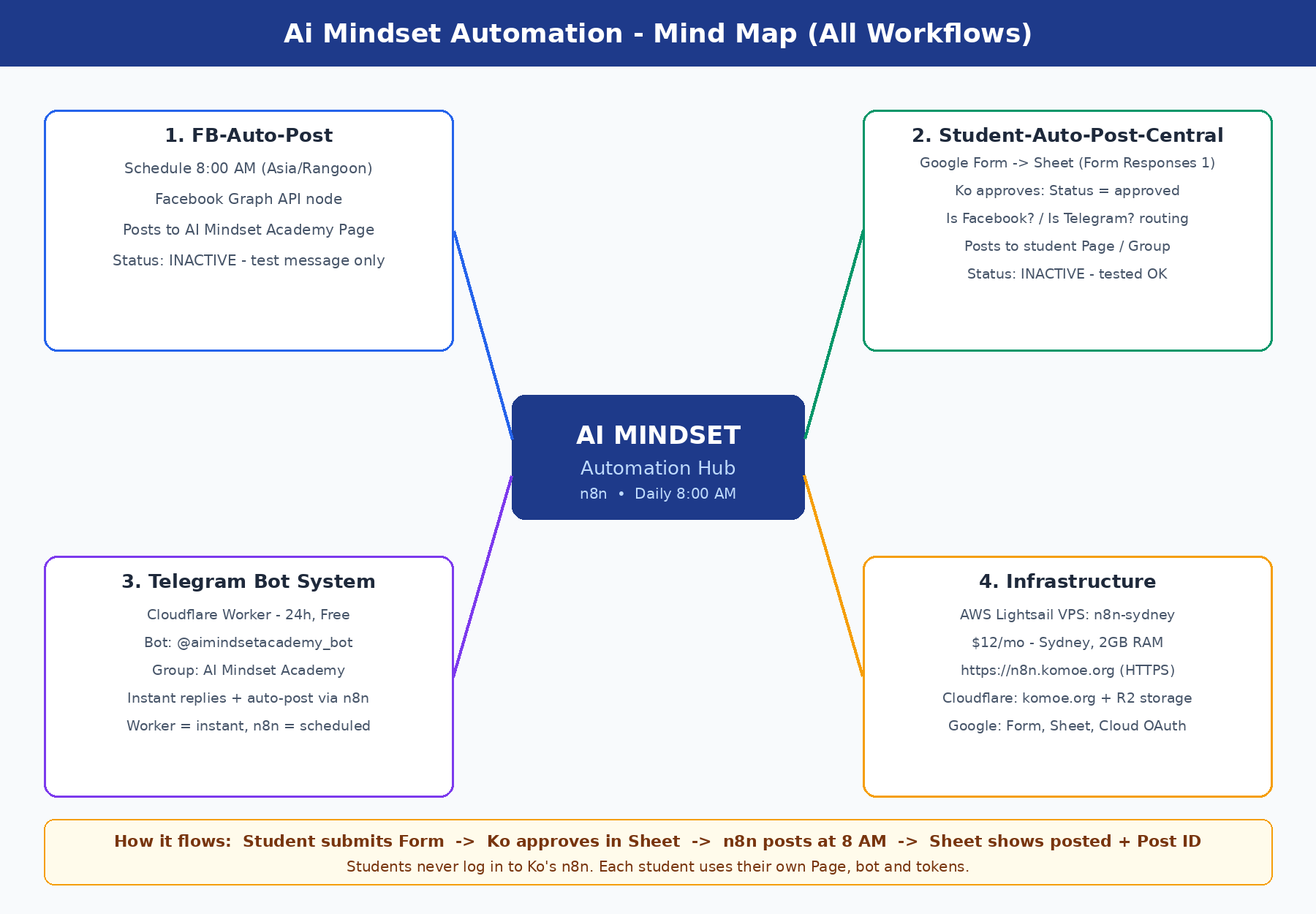
Hub: n8n on AWS Lightsail VPS (n8n-sydney, Sydney, $12/mo) at https://n8n.komoe.org
- FB-Auto-Post: Schedule 8:00 AM → Facebook Graph API → AI Mindset Academy Page (inactive, test message only)
- Student-Auto-Post-Central (Phase 1): Form → Sheet → Ko approves → posts to student Page / Group (tested OK)
- Telegram Bot: Cloudflare Worker, 24h free, @aimindsetacademy_bot — instant replies; n8n does scheduled posts
- Infrastructure: AWS Lightsail, Cloudflare (komoe.org + R2), Google Form / Sheet / Cloud OAuth
2. Phase 1 Workflow Diagram
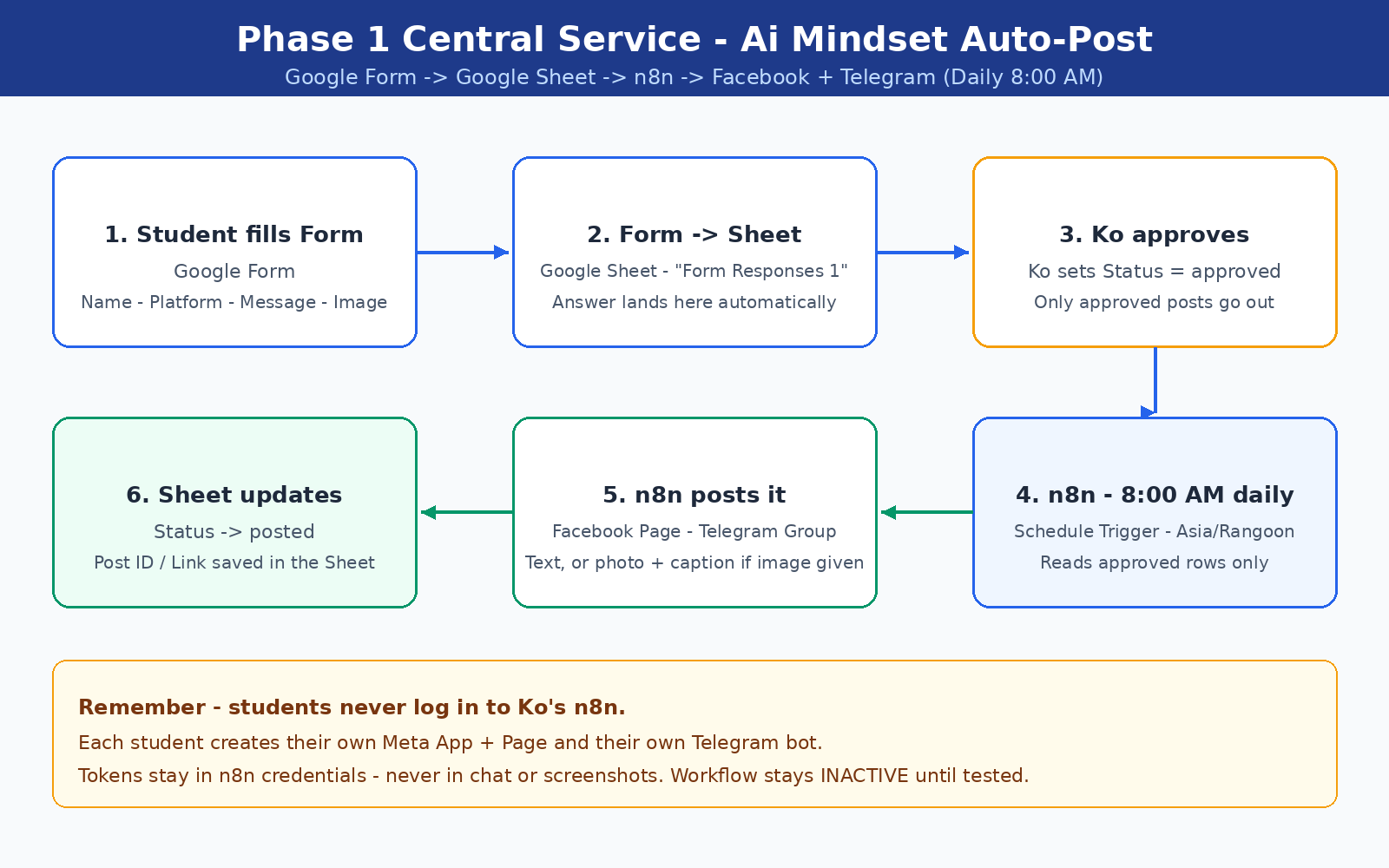
- Student fills the Google Form (Name, Platform, Destination, Message, Image URL)
- Form answers land in Google Sheet tab “Form Responses 1”
- Ko sets Status = approved in the Sheet
- n8n runs daily at 8:00 AM Asia/Rangoon and reads approved rows only
- n8n posts to Facebook Page and/or Telegram Group (Is Facebook? / Is Telegram? routing; Both posts to both)
- Sheet updates: Status = posted, Post ID / Link saved
3. Lesson Plan — Teach It in 4 Lessons
- Lesson 1 — AWS + $200 credit (30 min): sign up, earn the credit, create the Lightsail VPS
- Lesson 2 — VPS + n8n + HTTPS (45 min): install Docker + n8n, point n8n.komoe.org at it with Caddy
- Lesson 3 — Meta App + Facebook workflow (45 min): Pages API, Page token, FB-Auto-Post at 8:00 AM
- Lesson 4 — Phase 1 Central Service (45 min): Form → Sheet → Ko approves → n8n posts to Facebook + Telegram
Each lesson ends with a checkpoint and a “break it on purpose” debugging exercise — for example, leave Status as pending and see why nothing posts.
4. How to Find Your Destination ID
The Form asks for a Destination — the ID where n8n should post. It is NOT your Page name or your Telegram username. Find it like this:
Facebook Page API ID
- Open your Facebook Page, click your profile photo (top right) → Settings & privacy → Settings.
- Left menu → Audience and visibility → Page setup → your Page ID is shown there (a long number).
- Or: open your Page, look at the address bar —
facebook.com/profile.php?id=<YOUR_PAGE_ID>— the number afterid=is the Page ID. (Use YOUR Page's number, never share someone else's.) - Or in Graph API Explorer, run
GET /me/accounts— the"id"next to your Page name is the Page API ID.
Telegram Chat ID
- For a group: add the bot
@userinfobot(or@getmyid_bot) to your group, send any message in the group, and the bot replies with the group ID — it starts with-100, e.g.-1001234567890. Then remove the ID bot from the group. - For your own Telegram account (1-to-1): open
@userinfobotin Telegram, press Start — it replies with your personal user ID. - For your own bot's group: send a message in the group, then open
https://api.telegram.org/bot<YOUR_BOT_TOKEN>/getUpdatesin a browser — look for"chat":{"id":-100...}. Never share your bot token with anyone.
Remember: Facebook = Page API ID (long number, no minus sign). Telegram group = Chat ID starting with -100. Put the right one in the Form, matching the Platform you chose.
5. Links for Students
- Student Auto-Post Request Form — Open the Form
- Student Guide (GitHub) — https://github.com/komoe-mindset/ai-mindset-aws-n8n-facebook-auto-post
- Requirements Doc (Google Drive) — Open the Doc
Remember: Students never log in to Ko's n8n. Each student creates their own Meta App + Page and their own Telegram bot. Tokens stay in n8n credentials — never in chat or screenshots.